Quick answer: Facebook has two keyword filters: the Page setting under Public posts, and Moderation Assist custom keywords (which Meta says also covers ads). Both hide every comment containing a listed word, so choose words carefully.
Option 1: the Page keyword setting
- Switch into your Page, then click your Page’s profile picture in the top right.
- Click Settings & privacy, then Settings.
- Click Followers and public content, then Public posts.
- Click Hide comments containing certain words from your Page.
- Add words, phrases or emojis, separated by commas, then click Save.
The same screen has a toggle for Hide posts and comments with profanity. You need Facebook access to the Page. Steps from Meta’s Manage comment moderation for Facebook Pages.
Option 2: Moderation Assist custom keywords
- From your Professional dashboard, go to the Engagement tab.
- Tap Tools, then Moderation Assist.
- Tap Add in the Manage comments section.
- Choose the custom keywords criterion and add your words.
- Tap Add to Moderation Assist.
Moderation Assist also has criteria for links, images, videos, profanity and the person commenting, such as an account less than a week old. To see what it hid, open Activity Log from the same screen, where you can undo a hide. Steps from Meta’s Moderation Assist help page.
Which one should you use?
| Question | Page keyword setting | Moderation Assist |
|---|---|---|
| Covers ads | Not stated by Meta | Yes, ads that you run |
| Catches misspellings | Not stated by Meta | Yes |
| Older comments | Not stated by Meta | No, only new comments |
| Log of what was hidden | Not stated by Meta | Yes, the Activity Log |
For ad comments, Moderation Assist is the safer choice of the two. See our CommentHide vs Meta Moderation Assist comparison.
The problem with keyword filters on ads
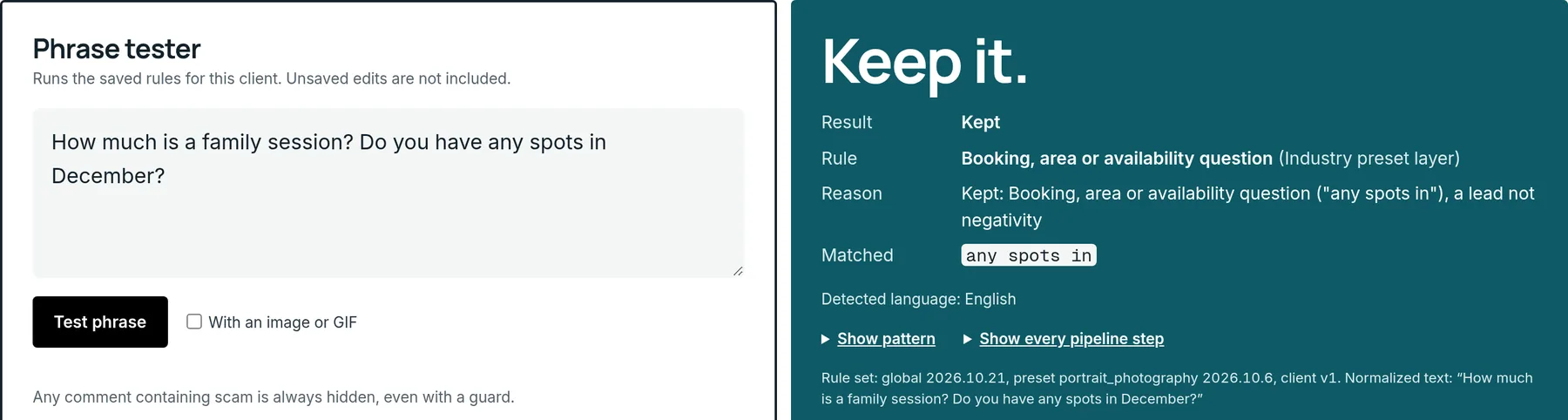
A keyword filter can’t tell who a word is aimed at, or whether it is part of a question. Add “price” and you hide “What’s the price for a family session?”. Leave it off and you miss “Overpriced rubbish”. Complaints written in words you didn’t think of get through.
A few habits help:
- Start with a short list of words that are never part of a good comment.
- Check what was hidden after a few days and remove words that caught real questions.
- Keep an eye on comments the filter can’t catch, such as complaints and scams in new words.
How CommentHide goes beyond keywords
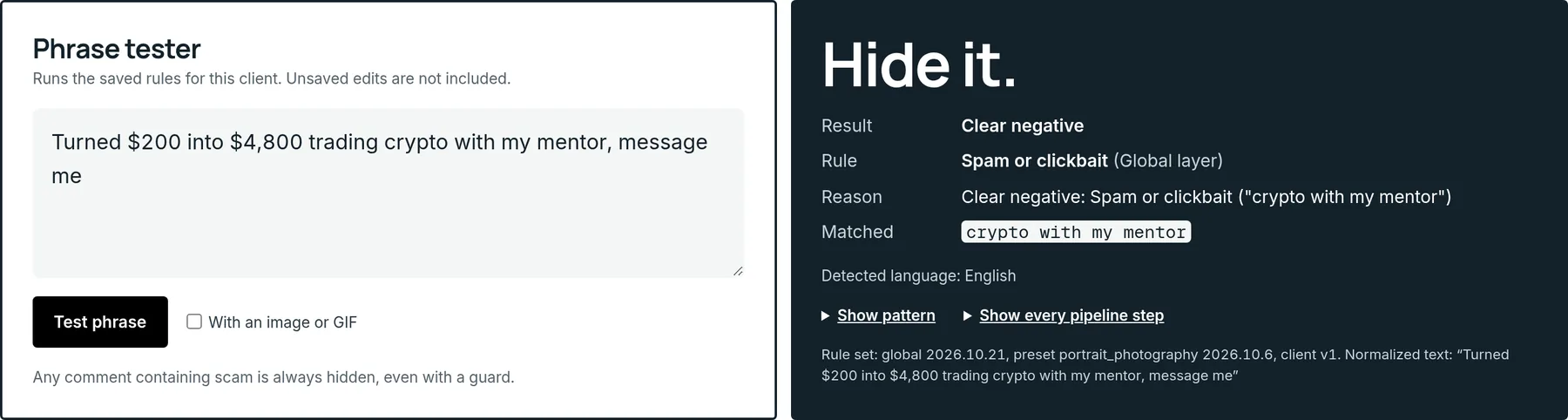
CommentHide checks each comment against rule groups and an industry preset, not just a word list. Price and booking questions are kept, unsure comments go to a review list, and disguised spellings such as sh1t or spaced-out letters are caught. You can add your own block, keep and review phrases and test them before they go live: see add block, keep and review phrases.
Frequently asked questions
Does the Facebook keyword filter work on ad comments?
Moderation Assist does: Meta says it hides comments on your Page, profile or ads that you run. The Page setting is described as hiding comments “from your Page”, and its help page doesn’t mention ads. Sources: Moderation Assist and Page comment moderation.
Does it hide comments that were already posted?
Moderation Assist only hides comments made after you add the criteria, according to Meta. Older comments have to be hidden by hand.
Does the keyword filter catch misspellings?
Moderation Assist does: Meta says variations such as TREE, t.r.e.e., tr33 and #tree trigger a keyword of tree. Meta’s help page for the Page setting doesn’t say.
Can the person tell their comment was hidden?
Meta says the writer isn’t told. A hidden comment stays visible to the person who wrote it and their friends, and is hidden for everyone else. Sources: Facebook Help Center and Meta Business Help Center.
What words should I add?
Words that are never part of a good comment: slurs, profanity your audience doesn’t use, competitor names you don’t want promoted. Avoid words a buyer might use, such as price, cost, catch or legit, or you will hide your leads too.
Want your ad comments cleaned up automatically? Connect your Facebook and Instagram ad accounts and the first scan runs straight away.