CommentHide needs access to your Facebook Pages, Instagram accounts and ad accounts to read and hide the comments on your ads. Here is exactly what it asks for, what it stores and how you stay in control.
What access we need
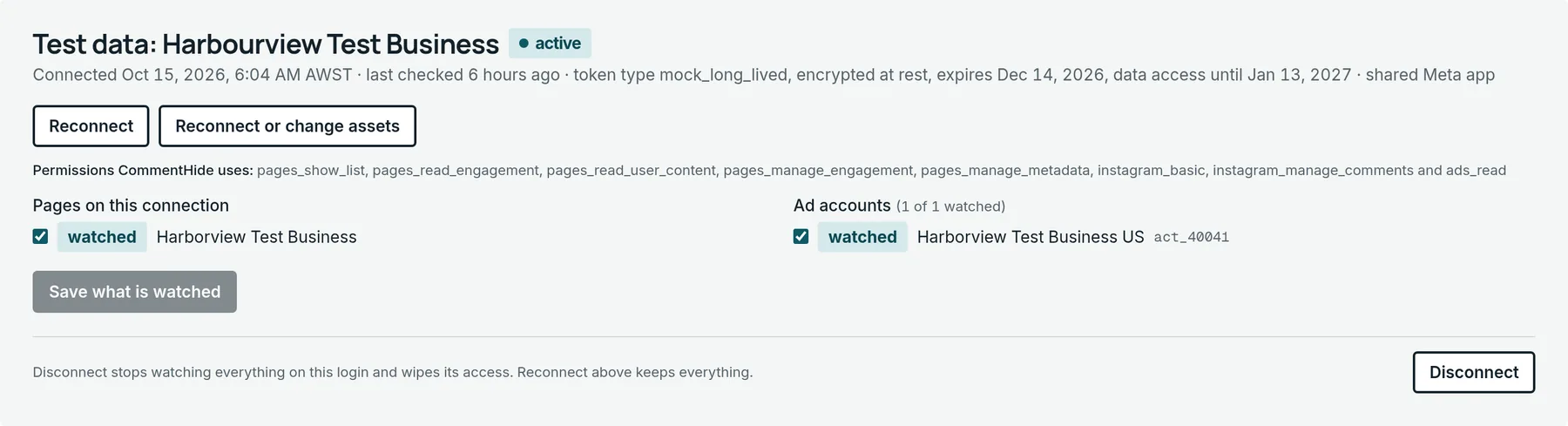
When you connect, Facebook asks you to approve these permissions. CommentHide asks for nothing else.
- pages_show_list, to list the Pages you can connect.
- pages_read_engagement and pages_read_user_content, to read comments on your Page posts and ads.
- pages_manage_engagement, to hide and unhide comments.
- pages_manage_metadata, to subscribe your Page to comment updates from Meta.
- instagram_basic and instagram_manage_comments, to read and hide comments on Instagram.
- ads_read, to find which ads are live or recently paused. It is read-only, so CommentHide cannot change your ads.
It does not ask for business_management, so it has no access to your Business Manager.

What we store
- Comment IDs, the text needed to classify each comment, and the decision made with its reason.
- Your Meta access tokens, encrypted at rest with AES-256-GCM. Each workspace has its own data key. Tokens are never shown in logs or error messages.
- Two-factor secrets, also encrypted.
Signing in
- Two-factor sign-in with an authenticator app.
- Sessions last 14 days, and Sign out everywhere ends every session at once.
A record of every change
The activity log shows who changed what, and when. It covers rule edits, hides and unhides, settings, team changes and every scan, and you can export it as CSV.
What we never do
- We only delete comments or reply if you switch those features on, and any ban can be undone in one click. Hiding is the default, and nothing is ever deleted automatically.
- We never change your ads.
- We never sell your data.
Disconnecting and deleting
Disconnect a login in Settings, under Meta connections, and CommentHide stops watching everything on it and wipes its access. You can also remove CommentHide in your Facebook settings at any time.
Owners can delete a client or the whole workspace from Settings, and anyone can delete their own account. See data deletion and our privacy policy.
Frequently asked questions
Can CommentHide change or pause my ads?
No. It only has read access to your ad accounts (ads_read), so it cannot change ads, budgets or audiences.
Does CommentHide delete comments?
Only if you switch Delete on. Hiding is the default, and any hide can be undone.
How do I remove CommentHide’s access?
Disconnect the login in Settings, under Meta connections, or remove CommentHide in your Facebook settings. Deleting your workspace removes everything in it.