Businesses and agencies use CommentHide to hide negative, spam and scam comments under Facebook and Instagram ads. The common jobs are protecting lead ads, managing many client accounts, stopping spam and scams, hiding competitor plugs and keeping comments checked overnight and on weekends. Each one is below.
Use cases
- Protect lead gen ads: keep the inquiries, hide the pile-ons.
- Agencies managing many clients: every client’s ad comments from one login.
- Spam and scam comments: crypto, fake giveaways and impersonators.
- Competitor comments: hide rivals who plug their name or link under your ads.
- Always-on moderation: overnight and weekend checks in your audience’s time zone.
Looking for your industry? See industries.
Always-on moderation
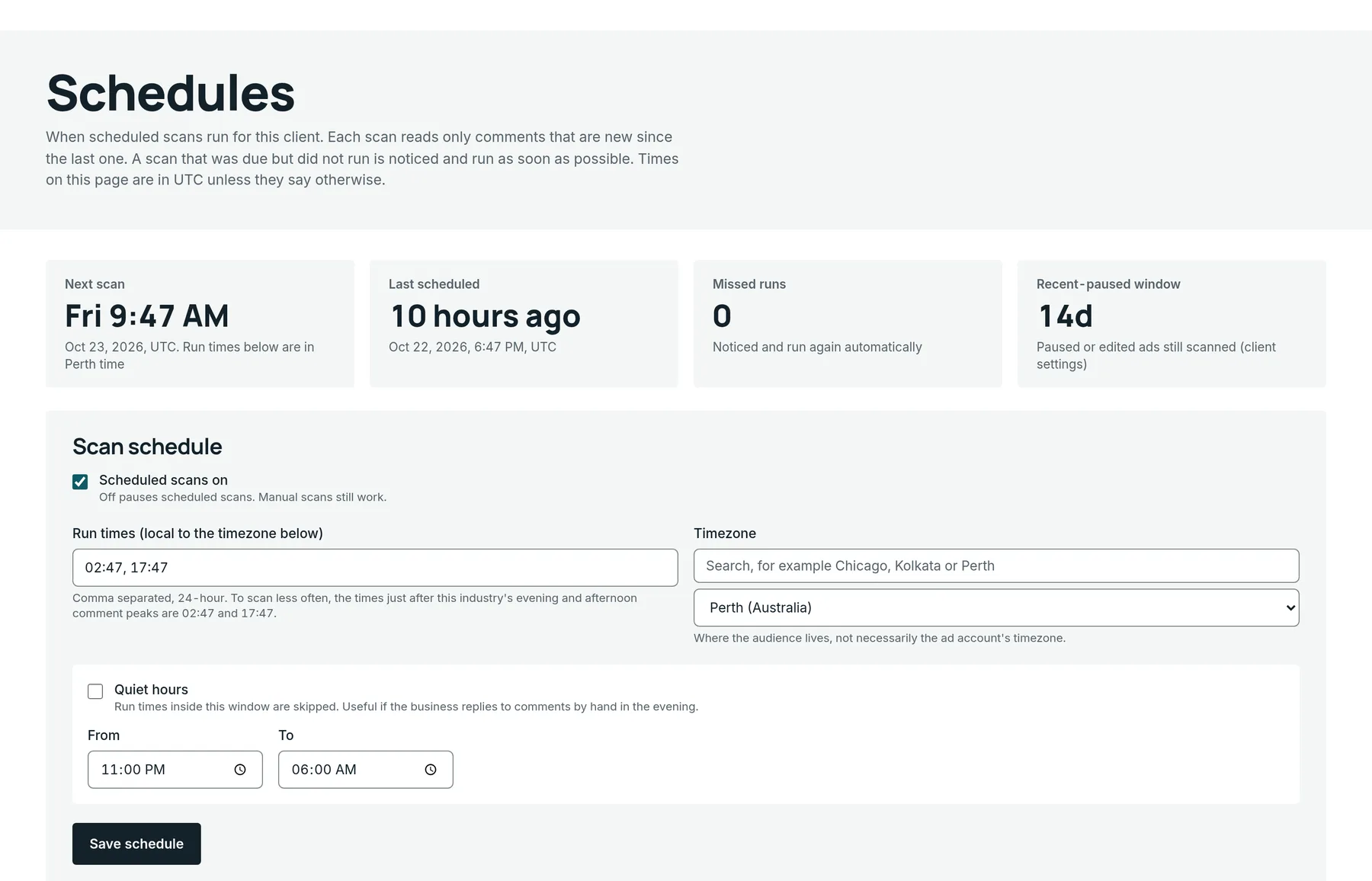
Negative comments do not wait for office hours. CommentHide keeps checking your Facebook and Instagram ad comments overnight and on weekends, in the time zone your audience is in, and leaves the judgment calls for the morning.
How it keeps running
- New comments are checked as Meta reports them on every paid plan, with a scheduled scan as a backup. You can also run a scan at any time.
- Run times follow your audience. Each client has a business location and an audience time zone, and scheduled run times are set in that client’s time zone.
- Quiet hours (Pro and up) skip run times inside a window, useful if you reply to comments by hand in the evening.
- Alerts tell you when a negative spike or a crisis keyword appears, or when the Facebook connection breaks, by email or Slack, plus Microsoft Teams and phone push on Pro and up.
What waits for a person
Clear negatives and scams are hidden as they come in. Anything unsure goes to review instead, so nothing ambiguous is hidden while you sleep. In the morning, clear the review queue in one pass: keep, hide or reply.
Across regions
Agencies with clients in different countries set the audience time zone per client, so each client runs on its own clock. Every hide is logged with the rule that matched, and any hide can be undone.
See how it works, reports and alerts or pricing.
Competitor comments
Rivals drop their name, their number or their link under your ads, and you pay for the reach. CommentHide hides comments that name the competitors you list, and sends the judgment calls to review.
Competitor names
On the Rules page, add one competitor per line under Competitor names. Comments naming them are hidden, with fuzzy matching so spaced-out and disguised spellings count too. It is built in, so there is nothing else to set up.
Links, numbers and tags
- Spam that sends people elsewhere, such as “link in my bio” and “message me on WhatsApp” comments, is hidden like any other spam.
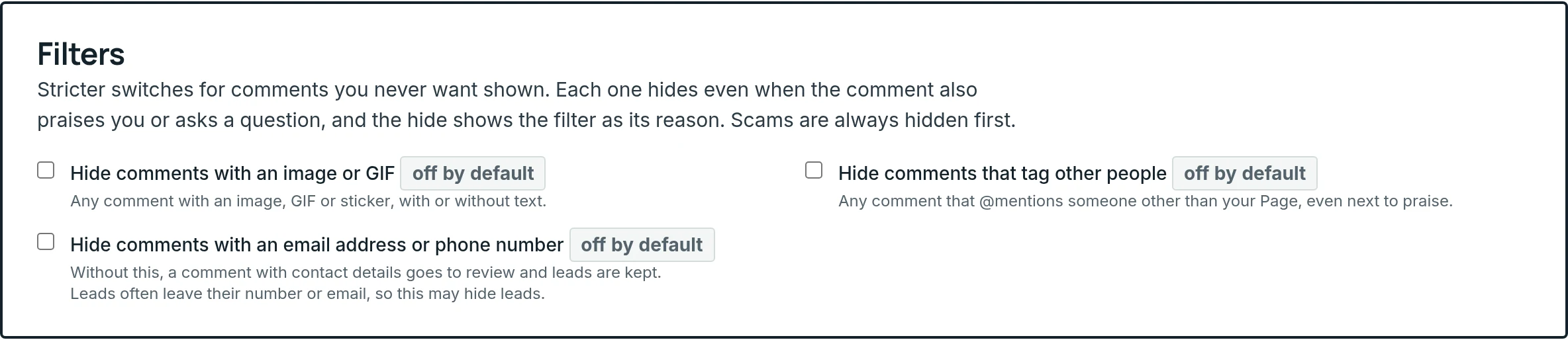
- A comment with an email address or phone number goes to review, because leads leave their number too. A switch under Filters hides them all if you prefer.
- A switch under Filters hides any comment that tags other people.
Comments that send people elsewhere
Even without a name on your list, comments sending people to a competitor count as clearly negative comments. They are hidden, or wait under Needs review for a person if you switch Hide them off for that group. Every hide is logged with the rule that matched, and any hide can be undone.
See rules and presets or all features.
Frequently asked questions
Does CommentHide need my team to be online?
No. Rules run on their own. Only comments in review wait for a person, and nothing in review is hidden until someone decides.
Can I stop it from hiding while I reply by hand?
Yes. On Pro and up, quiet hours skip the run times inside a window you choose. Pause hiding switches automatic hiding off at once, and scans keep sorting comments into the review queue so nothing is missed.
What if a customer mentions a competitor in a fair question?
Comments that name a competitor on your list are hidden, even next to a question. If you would rather decide those yourself, leave the name off the list and answer them from the review queue when they land there.
Does it catch misspelled names?
Yes. Competitor names use fuzzy matching, so spaced-out letters and swapped characters still count.
Research and comparisons
The numbers behind CommentHide are published: our study of 4,179 ad comments, ad comment statistics, how the study was run and why the Meta API can show fewer comments than the ad. To weigh up other tools, see how CommentHide compares.
Want your ad comments cleaned up automatically? Connect your Facebook and Instagram ad accounts and the first scan runs straight away.