Meta Moderation Assist is Facebook’s free built-in tool. It hides new comments that match criteria you pick, such as links, keywords, profanity or a new account. CommentHide reads what each comment says, keeps price and booking questions, holds unsure comments for review and covers Instagram ads too. Many advertisers will be fine with Moderation Assist.
At a glance
| Feature | Meta Moderation Assist | CommentHide |
|---|---|---|
| What it is | A built-in Facebook tool for a Page or a profile in Professional Mode | An independent tool for Facebook and Instagram ad comments |
| Price | Free | Free plan, paid from $29/mo per brand |
| Where it hides | Your Page, profile or ads that you run | Your Facebook and Instagram ads, including dark posts |
| Not covered on Meta’s Moderation Assist help page (Instagram has its own settings) | Yes | |
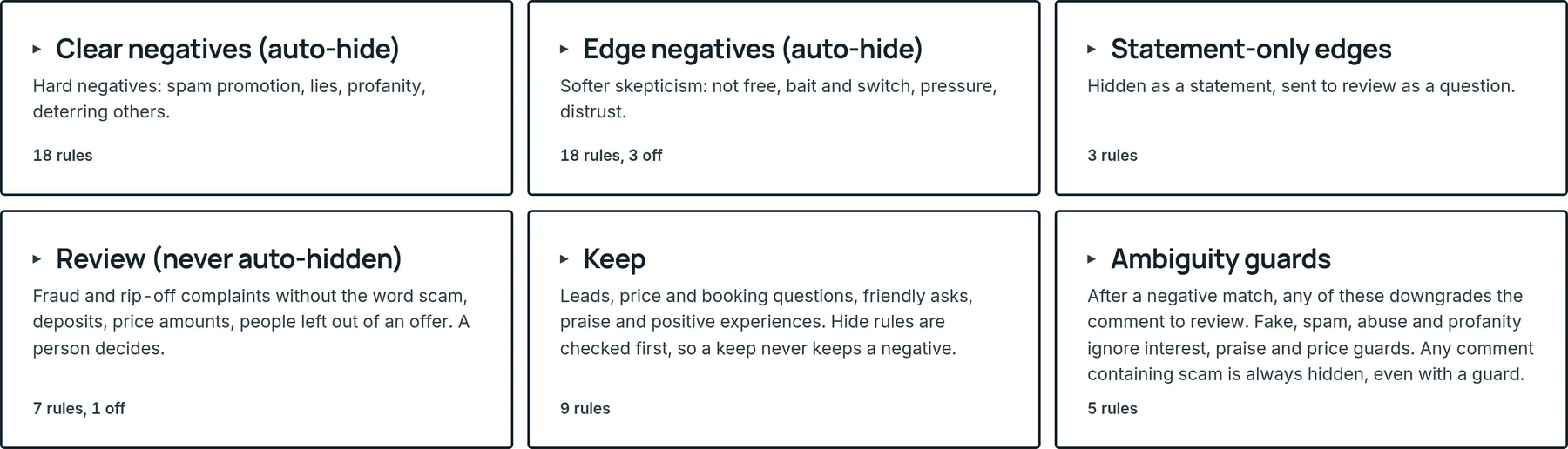
| How it decides | Matches the criteria you add | Reads each comment against rule groups and an industry preset, with a reason for every decision |
| Older comments | Only comments made after you add the criteria | The first scan reads up to 500 comments from the last 30 days and shows what it would hide, without hiding anything yet |
Features compared
| Feature | Meta Moderation Assist | CommentHide |
|---|---|---|
| Hide by custom keyword, including disguised spellings | Yes (variations such as tr33 and t.r.e.e.) | Yes (spellings such as sh1t, spaced-out letters and fancy fonts) |
| Hide profanity | Yes, in eight languages | Yes |
| Hide comments with links | Yes, any link or a specific site | Yes, including “link in my bio” comments |
| Hide comments with an image or video | Yes | Images, GIFs and stickers, with a filter you switch on |
| Hide by who is commenting (no profile picture, new account, possible fake identity, past reported comments) | Yes | No. CommentHide judges the comment, not the account |
| Complaints and negative comments without your keywords | No matching criterion | Yes, read against rule groups and your industry preset |
| Keeps price and booking questions by default | Not a feature (a keyword criterion hides any match) | Yes |
| Review list for unsure comments | No. Matches are hidden, then reviewed in the Activity Log | Yes. Unsure comments wait for your decision |
| Log with the reason for each hide, and undo | Yes, the Activity Log shows the criteria met, with Undo | Yes, with the rule that matched and Undo |
| Reports and team access | Moderation insights in the Activity Log | Reports, client reports and team roles |
Source for Moderation Assist: Manage comments with Moderation Assist on Facebook, Meta Business Help Center, read 23 October 2026. Meta changes its tools, so check that page before deciding.
How each one handles a real comment
A comment like “How much is a session and do you have December dates?” is a lead. A keyword criterion for “how much” would hide it. CommentHide keeps it as a booking question:
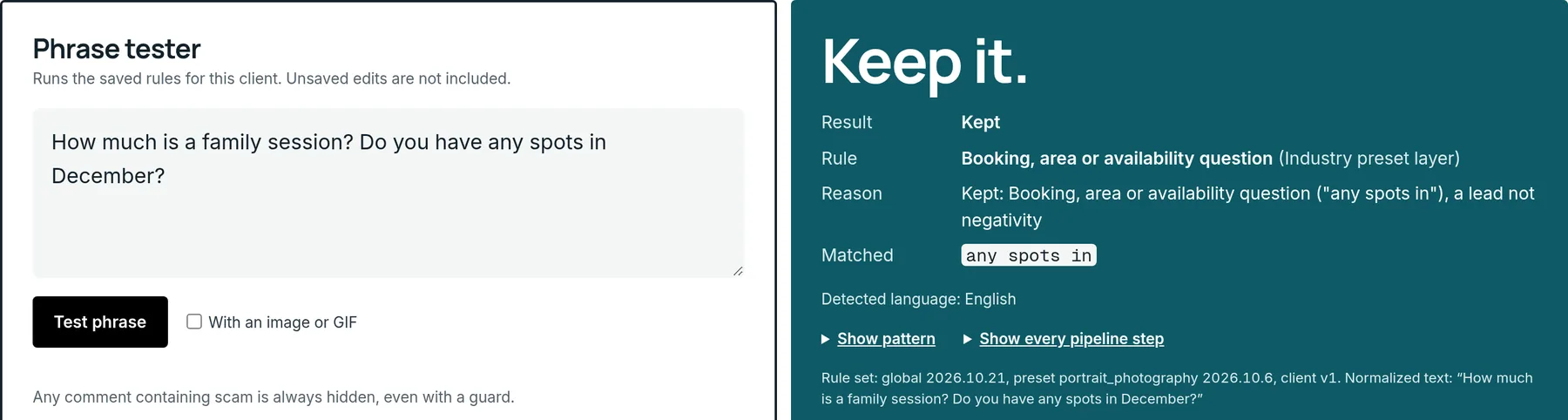
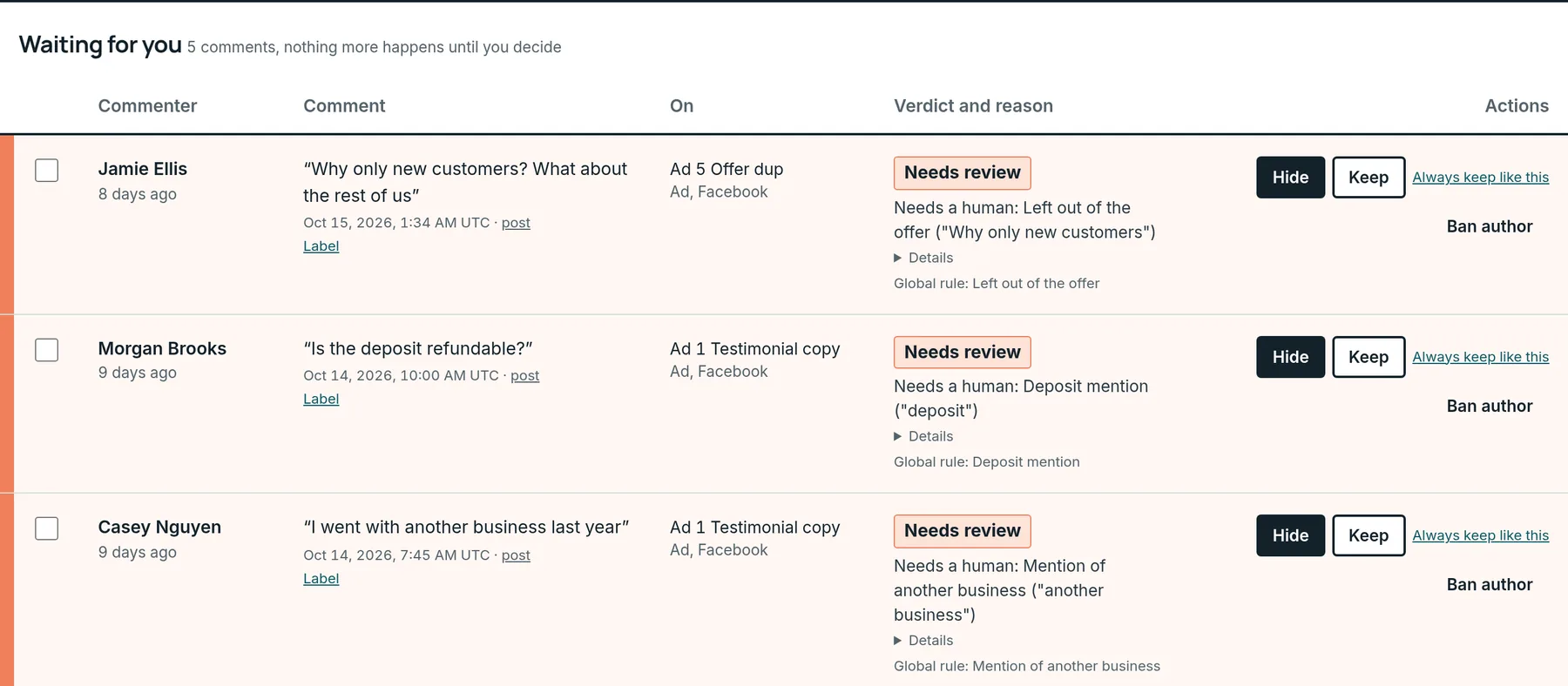
Comments CommentHide isn’t sure about are held for a decision instead of being hidden automatically:
Where Moderation Assist is the better choice
- You want something free that is already in your Facebook account.
- Your problem is mostly links, images, profanity or a known list of words.
- You want to hide comments from new or suspicious-looking accounts.
Where CommentHide is the better choice
- You run ads on Instagram as well as Facebook.
- Negative comments under your ads don’t use predictable words.
- Price and booking questions must stay up, even when they sound blunt.
- You want unsure comments held for review, and a report you can show a client.
Setting up Moderation Assist
- From your Professional dashboard, go to the Engagement tab.
- Tap Tools, then Moderation Assist.
- Tap Add in the Manage comments section.
- Pick a criterion for the author or the comment, then tap Add to Moderation Assist.
Those are Meta’s steps from the help page above. To review what it hid, open Activity Log from the same screen.
How we compare: Meta details come from Meta’s public help pages, checked on 23 October 2026. Tell us if something here is out of date. See also how to hide comments on Facebook ads and all comparisons.
Frequently asked questions
Is Facebook Moderation Assist free?
Yes. It is a built-in tool for a Facebook Page or a profile in Professional Mode, set up from the Professional dashboard under Engagement, then Tools. CommentHide has a Free plan, and paid plans start at $29 a month per brand (see pricing).
Does Moderation Assist work on ad comments?
Meta says it hides comments on your Page, profile or ads that you run, and only comments made after you create the criteria. Source: Meta Business Help Center.
Can Moderation Assist hide comments that don’t contain my keywords?
Its comment criteria are links, a link to a specific site, images, videos, your custom keywords (including variations such as tr33 for tree) and profanity in eight languages. It also has criteria about the person commenting, such as an account less than a week old. A complaint or a scam written in new words, from an established account, would not match any of those.
Can I use both?
Yes. They both hide comments, so you can keep Moderation Assist for the author-based criteria and use CommentHide for reading what each comment says. Check both logs when a comment you expected to see is hidden, so you know which tool hid it.
Is CommentHide made by Meta?
No. CommentHide is an independent product that connects to Facebook and Instagram through Facebook Login. It is not made, endorsed or approved by Meta.
Research and comparisons
The numbers behind CommentHide are published: our study of 4,179 ad comments, ad comment statistics, how the study was run and why the Meta API can show fewer comments than the ad. To weigh up other tools, see how CommentHide compares.
Want your ad comments cleaned up automatically? Connect your Facebook and Instagram ad accounts and the first scan runs straight away.
Facebook, Instagram and Moderation Assist are trademarks of Meta Platforms, Inc. CommentHide is not affiliated with, endorsed by or approved by Meta. Comparisons are based on publicly available information and may change.