Help center / Connecting Facebook and Instagram
Quick answer: Open Settings, Connections, choose Continue with Facebook, and pick the Pages, Instagram business accounts and ad accounts to protect. CommentHide uses Facebook Login for Business and never asks for your password. Watched assets are scanned; a Page marked no access was not shared.
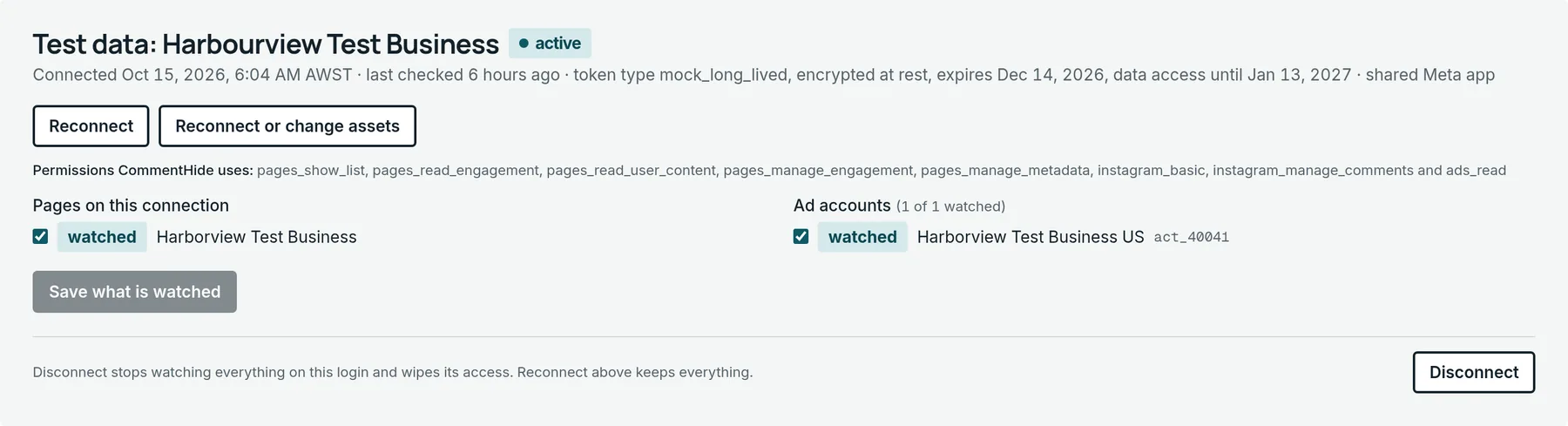
Steps
- Open Connections under Settings in the sidebar.
- Choose Continue with Facebook and sign in.
- Select the Pages, Instagram business accounts and ad accounts to protect. Everything you select is watched.
- Back in CommentHide, check each Page shows watched. A Page marked no access was not shared.
- To change what is shared later, choose Reconnect or change assets.
What access we ask for
Permission to read your Pages, ads and comments, and to hide comments. Deleting and replying only happen if you switch those features on. See security and data.
Frequently asked questions
Does CommentHide ask for my Facebook password?
No. CommentHide connects with Facebook Login for Business. You sign in with your own Facebook account and choose what to share. We never ask for your password.
Which assets should I share?
Share every Facebook Page, Instagram business account and ad account you want protected. Everything you select is watched. Leave out assets you do not want scanned.
What does no access mean on a Page?
A Page marked no access was not shared when you connected. Choose Reconnect or change assets on Settings > Connections and tick it so CommentHide can read and hide comments there.
Can I change what is shared later?
Yes. Open Settings > Connections and choose Reconnect or change assets. Add or remove Pages, Instagram accounts and ad accounts, then confirm each watched Page shows watched.
What permissions does CommentHide ask for?
Permission to read your Pages, ads and comments, and to hide comments. Deleting and replying only happen if you switch those features on. See security and data for the full list.
Related articles
- Set up CommentHide, step by step
- Fix a broken Facebook connection
- Check your coverage
- Moderate comments in Meta Business Suite
- CommentHide features
Screenshots show the dashboard with sample data and may differ slightly from what you see.
Still stuck? Browse the help center or contact us.